
Dial in Any Filament Faster with AI-Generated Slicer Profiles
Upload a filament data sheet and get a ready-to-print slicer profile in seconds — tuned for your exact printer.
72+ printers · 400+ filaments · Settings sourced from manufacturer TDS
See Filwiz in Action
Real screenshots from the platform — here's what you can do.
Feature Spotlight
AI Slicer Profiles from Your TDS
Upload a filament data sheet and get a printer-tuned profile with confidence labels on every setting — then export to Bambu Studio, Orca, PrusaSlicer, or Cura.
Generate My Profile →Why Filwiz vs Doing It Manually?
Most makers piece together settings from scattered sources. Filwiz does it in one step.
Why Makers Choose Filwiz
Every setting is sourced and labeled — you always know exactly where it came from.
72+
Printers supported
400+
Filaments in library
4
Slicer formats
How Filwiz Works
Transparent, data-driven profiles — not guesswork. Here's what powers every recommendation.
Manufacturer Data Sheets
We extract temperature ranges, density, moisture specs, and mechanical properties directly from the TDS you upload.
Material-Specific Rules
PLA, PETG, TPU, ASA — each material type has distinct behavior. Our AI applies rules specific to the material family for speed, cooling, and retraction.
Printer Context & Slicer Formatting
Settings are tuned for your specific printer model — nozzle size, max flow, motion system — then formatted for your slicer.
Confidence Labels
Every setting is tagged: "From TDS" when sourced directly, "AI-estimated" when inferred, or "Default" for safe starting values.
Your Shortcut from Data Sheet to First Layer
Filwiz reads the specs so you don't have to — then turns them into profiles tuned for your exact printer.
AI Data Sheet Analysis
Upload a PDF or image of your filament's data sheet. Our AI extracts all specs and generates optimized settings.
Calibration Wizard
Step-by-step guides for temperature towers, retraction tests, and flow calibration with AI validation.
AI Assistant
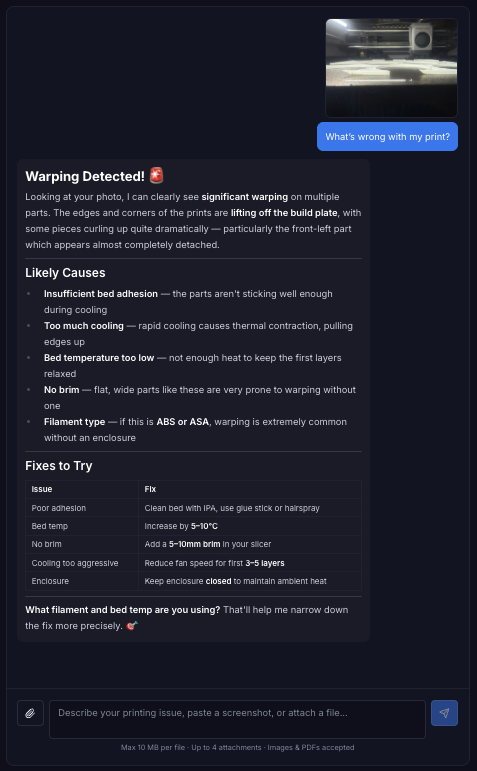
Chat with our AI about stringing, warping, layer adhesion, or any printing problem. Get actionable fixes.
Filament Library
Browse community-shared filament profiles with ratings. Save your own collection for quick access.
Multi-Slicer Export
Download optimized profiles for Bambu Studio, OrcaSlicer, PrusaSlicer, or Cura.
Filament Explorer
Browse and compare filaments across 33+ brands. Find the best prices and buy through trusted retailers.
Popular guides
- How to Create a Custom Filament Profile in OrcaSlicer
- PLA vs PETG vs ABS: Which 3D Printing Filament Should You Use?
- How to Calibrate Your 3D Printer for Perfect Prints
- Best Filament Brands for Beginners in 2026
- How to Fix Common 3D Printing Problems
- How to Read a 3D Printing Filament Data Sheet (TDS)
- PLA vs ABS: Which Is Actually Stronger? Tensile Strength vs. Toughness Explained
- The Complete Guide to Drying 3D Printing Filament: Methods, Materials & Best Practices
- Budget vs Premium 3D Printer Filament: Which One Should You Actually Buy in 2026?
- How to Fix Stringing, Blobs, and Oozing in 3D Prints: The Complete Troubleshooting Guide
- Engineering Filaments: PETG, ASA, and Nylon — When and How to Print Them
- Bambu Lab High-Speed Printing: Profiles, AMS Tips, and Filament Compatibility for P1S and X1C
- PLA Heat Resistance Explained: Glass Transition vs. Melting Point
- ABS Filament Printing Temperature: The Correct Range and Why It Matters
- Is PETG Food Safe? The Truth About 3D Printed PETG and Food Contact
- PLA vs PLA+: What Actually Changes (With Manufacturer Data)
- PETG vs PLA for Functional Parts: Heat, Impact, and Print Settings
- Silk vs Matte PLA: Finish, Strength, and Temperature Differences
- High-Speed PLA vs Standard PLA: Do You Need It?
Simple, One-Time Pricing
No subscriptions. Pay once, get permanent access to all current Pro features.
Popular filament settings
- Anycubic PLA Basic
- Anycubic PLA+
- Anycubic PETG
- Anycubic ABS
- Anycubic TPU 95A
- Anycubic ASA
- Anycubic PLA Silk
- Anycubic PLA High Speed
- Anycubic PLA Matte
- Anycubic PLA Metal
- Anycubic PLA Marble
- Anycubic PLA-CF
- eSUN PLA+
- eSUN PETG
- eSUN PLA-Silk
- eSUN ePLA-ST
- eSUN ePLA-HS
- Creality Hyper Series PLA
- Creality Hyper Series PETG
- Creality Soleyin Ultra PLA
- Creality CR-PLA
- Creality CR-PETG
- Bambu Lab PETG Matte
- eSUN ASA-LW
- SUNLU Silk PLA+ 2.0
- SUNLU PETG 2.0